7 Essential Steps In Project Management For Tech Implementation
Two out of three technology ideas fail and 75% of IT leaders say their projects feel doomed from the start. The problem is not the tools but weak planning, tech work faces fast-moving needs, cyber threats and technical links that can stop progress overnight.
Success needs methods that match technical detail to business goals and stay adjustable as platforms change. Strong supervision ties engineering to business aims and these steps here are proven, field-tested practices to deliver on time, on budget and at the right quality.
1. Define Clear Objectives

Start by saying exactly what you want the technology to do and why. Unclear aims like "improve efficiency" or "modernize systems" do not work. Tie goals to real business needs and use specific targets.
Define Success Metrics
Pick concrete metrics up front. Examples include lower costs, higher revenue, faster processing, or better customer ratings. A clear target looks like this: Reduce order processing time 30% and stop manual data entry errors that now cost $500,000 a year.
Capture Functional And Technical Needs
Write down what the system must do and the qualities it must have, such as speed, security, scale, and ease of use. Talk to leaders, daily users, operations, and security so you do not miss important needs. This discovery takes time but saves big changes later.
Create The Project Charter
Make one document that states the business case, main needs, key people, how you will judge results, budget limits, and a rough timeline. Use this charter to settle disputes about scope or priorities.
Record Assumptions And Limits
List any conditions you depend on, for example existing infrastructure or fixed budget limits. Stating assumptions clearly prevents surprises that can derail the work.
2. Select The Right Methodology

Tech work can follow different approaches. Your choice shapes how the team plans, talks, and delivers results. Pick the wrong path and the team will fight the setup through every phase.
Waterfall For Expected Technology Action
Waterfall is a step-by-step process, gather requirements, design, build, test, deploy, then maintain. It fits projects with fixed needs that will not change. Use it for infrastructure upgrades, hardware rollouts and compliance tasks.
When you move systems to known servers or add required security controls, Waterfall gives clear milestones and full documentation. Its downside is low tolerance for change; if needs shift or user input is unclear, it becomes a burden.
Agile For Growing Software Projects
Agile works in short cycles called sprints, usually one to four weeks. Teams deliver small, working pieces, get feedback, and change priorities from what they learn. This suits software that must adapt as users try early versions, such as customer-facing apps or internal tools.
Agile needs a product owner who can decide fast, developers comfortable with change, and regular input from people who use the product. Teams with strict approval rules or little Agile experience often find it hard to make this work.
Hybrid Approaches For Complex Execution
Many implementations mix methods. Use a structured approach for planning and a flexible one for building and testing. For example, plan infrastructure and architecture up front.
Then develop integrations in sprints so problems are found and fixed during work. The most important rule is to name which method applies to each phase and tell every team member. If roles and rules are unclear, both methods lose their benefit.
3. Build Your Cross-Functional Project Team

Treat technology work as a business change, not only an IT task. A strong team must mix IT skills, business knowledge, change expertise, and executive backing to succeed.
Core Team Roles
The project manager keeps the group on track, watches schedule and budget, and makes sure everyone shares information. This person should understand system limits and risks even if they do not write code.
Tech leads such as solution architects, senior developers and infrastructure experts decide how systems are built, turn business needs into designs and flag likely problems early.
Business analysts capture requirements from users, turn them into clear specifications, and confirm that the final solution fixes the original problems. This mix of skills often appears in profiles of tech entrepreneurs who became millionaires.
Essential Support Roles
Change managers prepare staff for new tools by building training, communications, and help systems that boost user acceptance. Security specialists must join early to set security needs, review designs and keep the rollout compliant.
Quality assurance teams test that the system works and meets user needs; continuous testing during development finds issues while they are still easy to fix.
4. Create Realistic Plans And Timelines
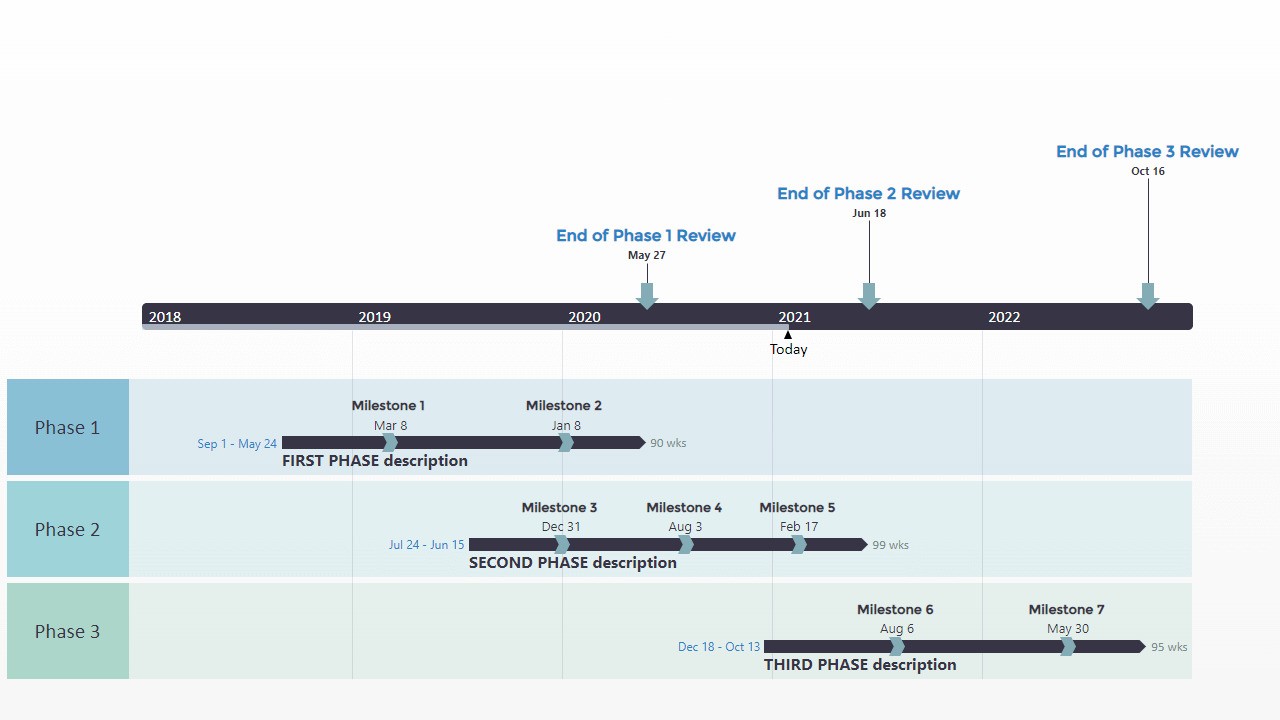
Unrealistic plans kill trust fast. For tech projects you need an honest view of what your team can do, given limits like skills, tools and complexity.
Work Breakdown Structure
Break the implementation into clear phases and smaller tasks. Start with big stages such as requirements, design, build, test and launch, then list the specific deliverables inside each stage.
For a CRM roll-out, include system setup, moving data, building integrations, training users, and launch support. For example, data moves should cover mapping, transformation rules, trial runs, checks and the final cutover.
Bring engineers into the planning. Their estimates show hidden steps and links between tasks and make the plan more accurate and accepted.
Realistic Time Estimates
Tech work usually takes longer than expected. Add buffers: multiply first estimates by 1.5 for routine work and by 2.0 for tasks that touch other systems or use new tools. Use your past projects as a guide actual timelines tell you more than general advice.
Show task order clearly; if testing waits for development, and deployment waits for testing, your schedule must reflect that. Use tools like Gantt charts or dependency diagrams to see how delays spread.
Resource Allocation
Remember people and environments are shared. A job that needs 40 hours of effort can stretch to three weeks if the person can only spend eight hours a week on it. Identify critical specialists early and confirm their availability.
Plan around real access to servers, test beds, and key staff instead of assuming full-time focus. Building the schedule from true availability reduces surprises and keeps delivery realistic.
5. Manage Risks Proactively

Managing threats well is what separates successful technology projects from failed ones. Every initiative will meet technical, resource, scope and security challenges. The key is spotting problems early and acting before they become crises.
Identify And Assess Threats
Work with your whole team to list possible problems. Technical examples include integration gaps, slow performance, data migration errors or old systems that no longer fit.
Business examples include changing requirements, stakeholder pushback, budget cuts, or shifting priorities. For each item, judge how likely it is and how much harm it could cause. Low likelihood and low impact need little attention. High likelihood and high impact need immediate plans. A simple chart that plots chance against impact helps you choose what to handle first.
Keep A Living Register
Record every identified issue in a single document that shows its likelihood, impact, planned actions, and current status. Update this file often, add new items as they appear, and review progress at regular intervals.
Common Implementation Problems
Integration is a common blocker. Old systems with no clear interfaces, APIs that behave unpredictably, and bad data can delay launch and raise costs. Do integration checks early to confirm critical connections work before full development.
Security flaws found late force costly rework. Involve security specialists in architecturedecisions and run security reviews throughout development. Building protections in from the start is far cheaper than fixing gaps later.
Stop Scope Creep
Uncontrolled changes to requirements derail timelines and budgets. Make every change go through a formal review that checks the effect on schedule, cost, and staff. Saying yes to every request is a fast route to failure.
Mitigation And Backup Plans
For major threats, write specific mitigation and fallback steps. If a vendor might miss delivery, plan a simpler interim solution or include financial remedies in the contract to cover emergency alternatives.
Validate technical assumptions with small tests before full rollout. If network capacity is a concern, run load tests early. If migration looks risky, do trial moves months before launch so there is time to fix issues.
6. Pratice Strong Communication And Manage Stakeholder

Technology projects touch many people with different needs. Leaders want brief status and budget notes. Engineers need clear specs and design decisions.
Daily users want to know how new tools will change their work. Plan messages that fit each audience so everyone gets the right level of detail.
Communication Planning
Build a simple structure that lists who gets what, how it is sent and how often. Send executives a monthly written update and a quarterly slide review.
Give technical staff daily stand-ups and detailed tasks in project software. Offer users a monthly newsletter and training invites. This setup keeps information flowing and reduces confusion.
Match Style To Audience
Give technical people strong details about architecture, combination and trade-offs. Show business teams the features delivered, benefits and effects on operations. Avoid long, one-size-fits-all meetings that waste time and leave people unsure of next steps.
Managing Expectations
Set honest limits on what the project can do and when it will happen. Share problems early so the team can fix them together. Late surprises erode trust and make recovery harder. Celebrate completed phases and quick wins to keep support and maintain momentum.
Change Management Communication
Run a separate stream focused on how new systems change jobs and skills. Start this outreach long before go-live. Explain how the system will make tasks easier, boost customer service, or unlock new work.
Offer regular chances for questions and feedback through town halls, office hours and anonymous surveys. Address concerns early to prevent resistance that can block a successful rollout.
7. Execute, Monitor And Adapt

With plans set and teams in place, begin work. Managing a tech rollout means more than following tasks blindly. Keep a steady eye on progress, quality, and risks, and be ready to adjust when reality differs from estimates.
Tracking Progress And Performance
Set clear measures that go beyond finished tasks. For agile project management, measure speeed, which shows how much the team completes each sprint. For Waterfall, watch milestone delivery and acceptance of outputs.
Also monitor budget use, how people and tools are assigned and quality signals like defect counts. Use project software to keep task status, links between work and blockers visible. The specific tool matters less than consistent use by everyone.
Quality Assurance Throughout Development
Test continuously, not only at the end. Run unit tests for parts, integration tests for connections and user acceptance tests for business needs. Find and fix issues early when changes cost less.
Include regular code checks, design reviews and security reviews to catch problems before they spread. Peer review raises quality and spreads knowledge, lowering reliance on single experts.
Managing Changes
Expect shifting needs and new technical ideas. Set up a clear change control process so every request gets reviewed. Ask for the business reason, the effect on timeline and budget, the resource impact and the risk of acting or not acting.
Record decisions so you can explain why some requests moved ahead and others paused. Watch the total effect of many small requests; together they can delay the whole effort. Regular scope checks reveal when accumulated changes need formal timeline or budget updates.
Course Corrections
When data shows work is off track, act quickly. Revise the schedule, add staff or trim scope instead of hoping things improve on their own. Hold regular back checks after sprints or phase gates to spot recurring issues and painful steps.
Ask what slows the team, what repeats and what new shortcuts helped. Apply those lessons to sharpen execution and keep the rollout moving.
Tools For Project Management For Tech Implementation
- Project management platforms- Jira tracks bugs, plans sprints and links with developer tools. Asana's simple layout and strong task features fit smaller projects or groups that value ease of use. Microsoft Project handles detailed schedules, resource planning, Gantt charts and connects smoothly with other Microsoft apps.
- Collaboration and documentation- Slack and Microsoft Teams give fast chat channels for distributed staff. Confluence or a similar wiki holds designs, architecture diagrams, setup notes, and runbooks in a searchable format.
- Development and delivery tools- Version control records code history, enables teamwork and lets you undo bad changes. Link commits to tasks in your management platform to keep traceability. CI/CD pipelines automate build, test and deployment steps.
FAQs About Project Management For Tech
Which Method Should I Choose For My Technology Project?
Pick Waterfall when requirements are fixed and unlikely to change, such as hardware installs. Pick Agile for software work where needs will change as users try early versions. Use a hybrid approach when you need structured planning plus room for change.
How Do I Prevent Scope Creep In Technology Projects?
Set clear, signed requirements at the start and define a formal change request process. Every new request should be checked for time, cost and resource impact before approval. Say no to changes that break the schedule or raise costs beyond what you can take or move them to a later phase.
What Are The Most Common Risks In Technology Implementation Projects?
Integration problems are common like old systems with poor interfaces or messy data that stops processes working. Security issues found late force rework and extra cost. Projects suffer when key experts are shared across work or leave midstream.
How Do I Measure Success In Technology Implementation Projects?
Look beyond schedule and budget and measure real business outcomes. Define metrics such as faster processing time, fewer errors, higher customer satisfaction, or lower operating cost and compare them before and after go-live. Track how many people use the new system and their satisfaction levels. Check technical health through defect counts, performance, security gaps, and any added technical debt. Also judge the project team’s delivery, change handling, and stakeholder confidence. True success is when the new tool actually improves how the organization works.
How Much Should I Budget For A Technology Implementation Project?
Expect software licenses or development to take about 30 to 40 percent of the budget, infrastructure and hardware 15 to 25 percent and project management 10 to 15 percent. Training and change work often need 10 to 15 percent, while testing and quality assurance take another 10 to 15 percent.
How Do I Get Stakeholder Buy-in For Technology Implementation Projects?
Start with a clear business case that shows how the project solves real problems and what people gain. Involve stakeholders early in requirements and design so they feel ownership rather than being handed a finished product. Give regular updates and celebrate small wins that show progress before full rollout.
Final Thoughts
Good project management decides if a tech effort gives a real advantage or wastes millions. Set objectives, pick a method, build the right team, make a realistic plan, identify and control risks, keep communication steady, and run the work with flexibility.
Choose an approach that fits your culture and the task. Keep your focus on business value, not on new tools for their own sake. Use these steps and you can turn big ideas into working systems that deliver measurable results.
Also Check Out: Free Digital Storytelling Tools For Teachers And Students