5 Interactive Storytelling Tools For Modern Game Creators
Essential Storytelling Tools For Modern Game Development
Storytelling is as old as humanity, but in games, it has evolved into something players can shape through their choices.
For creators, the real challenge isn’t just writing a good story; it’s choosing the right tools to build interactive narratives, dialogue systems, and branching paths that actually work in a game. The wrong choice can slow development, limit your design, or force you to rebuild systems later.
This article highlights:
- 15interactive storytelling tools for game creators
- Which tools fit specific game types (RPGs, visual novels, prototypes)
- Tools that integrate with Unity and production workflows
- A practical framework to help you choose the right tool and avoid common mistakes
1. Twine
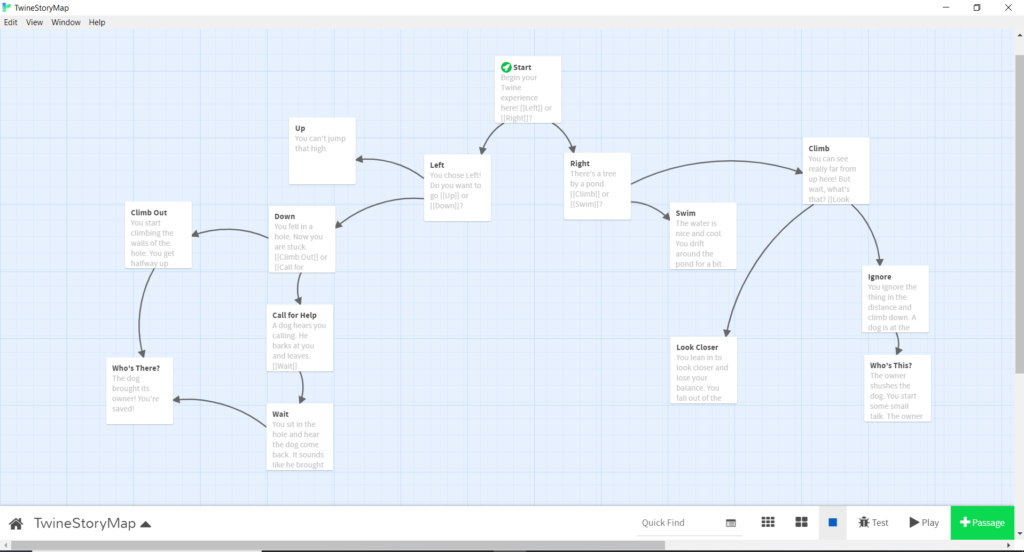
Twine is one of the most accessible interactive storytelling tools for game creators, especially beginners. It uses a visual interface where you connect story passages like a map, making it easy to build branching narratives without writing code. This makes it ideal for quickly testing story ideas, exploring player choices, and understanding how different paths connect.
The main limitation is scalability. As your project grows, managing complex logic, variables, and large story structures becomes harder compared to advanced game narrative tools. However, for early-stage prototyping or solo developers creating interactive fiction, Twine remains one of the fastest ways to turn ideas into playable story experiences.
2. StoryMap / Storyline Tools
StoryMap and similar tools are designed for planning and structuring game narratives before development begins. They help you visualize story arcs, player decisions, and scene progression in a simple flow format. This is especially useful for organizing nonlinear storytelling and ensuring your narrative makes sense before writing dialogue or code, similar to how digital storytelling tools for teachers and studentshelp structure interactive stories.
However, these tools are not built for direct integration into game engines like Unity or Unreal. You’ll still need to transfer your story into tools such as Ink or Yarn Spinner later. Their real value lies in improving clarity, collaboration, and early-stage decision-making in the game narrative design process.
3. Ink + Inky (Beginner Mode)
Ink, paired with its editor Inky, is a powerful entry point into narrative scripting for games. It allows you to write interactive stories using simple text-based logic while still supporting branching dialogue systems and conditional storytelling. Inky makes the experience more approachable by letting you preview and test your story as you build it.
Unlike visual tools, Ink requires learning a basic scripting structure, which can be a challenge at first. However, this trade-off gives you much greater control and scalability. For creators ready to move beyond no-code tools, Ink provides a strong foundation for building more advanced interactive storytelling systems.
4. RPG Maker
RPG Maker is a well-known game development tool that combines storytelling, gameplay systems, and world-building in one platform. It is especially popular for creating story-driven RPGs with dialogue, quests, and character progression. Its built-in systems allow creators to focus more on narrative and design rather than coding.
One of its biggest strengths is accessibility. You can create full games with minimal programming knowledge, while still having the option to customize systems as your skills grow. However, it is mainly suited for RPG-style games and may feel limiting for other genres.
5. Yarn Spinner
Yarn Spinner is a popular dialogue system tool for Unity, built specifically for games that rely heavily on character interaction. It allows developers to write and manage dialogue in a clean, readable format while integrating directly into Unity workflows. This makes it especially useful for creating branching dialogue trees and interactive conversations.
Its main limitation is that it focuses primarily on dialogue rather than full narrative systems. While it can handle choices and conditions, it’s not as flexible as Ink for complex storytelling logic. Still, for Unity developers building dialogue-driven games, Yarn Spinner is one of the most efficient and production-ready game narrative tools available.
6. Articy Draft
Articy Draft is widely recognized as an industry-standard narrative design tool used in AAA game development and large studio pipelines. It allows teams to build complex branching narratives, dialogue trees, and story worlds using a visual interface combined with structured data. This makes it easier to manage large-scale storylines, character relationships, and game logic in one centralized system.
Its biggest advantage is how it connects storytelling with production workflows. Writers, designers, and developers can collaborate using the same narrative framework, reducing confusion and improving efficiency. However, Articy Draft is more complex and better suited for teams rather than solo creators.
7. Fungus
Fungus is a visual scripting toolfor Unity that combines storytelling with gameplay logic. Instead of writing code, you use a block-based system to create dialogue sequences, branching choices, and event triggers. This makes it a strong option for developers who want to build narrative systems directly inside Unity without heavy programming.
One of Fungus’s strengths is how it connects story events with gameplay actions, such as triggering animations or changing scenes based on player decisions. However, it may feel limited for very complex narrative systems compared to tools like Ink.
8. Bitsy
Bitsy is a simple, browser-based tool for creating small interactive story games with pixel art. It is designed for beginners and focuses on quick creation, allowing you to build short narrative experiences with minimal setup. Its simplicity makes it one of the easiest entry points into interactive storytelling for games.
The limitation is its scope. Bitsy is not designed for complex systems, large worlds, or advanced gameplay mechanics. However, for creative experiments, short stories, or learning how player interaction shapes narrative, it’s incredibly effective. Many indie creators use Bitsy to prototype ideas or create small, meaningful story experiences.
9. Ren’Py
Ren’Py is one of the most popular visual novel engines, known for its ease of use and strong community support. It allows creators to build games with dialogue, character sprites, branching choices, and multiple endings using a simple scripting language. Many successful indie visual novels have been built with Ren’Py, making it a proven and reliable tool.
Its main limitation is flexibility. While it excels at visual novels, it is not ideal for other game genres that require complex gameplay systems. However, for creators focused on story-driven experiences, Ren’Py offers a complete and efficient solution. It remains one of the best interactive storytelling tools for visual novels.
10. TyranoBuilder
TyranoBuilder is a no-code visual novel tool designed for creators who want to build games without programming. It uses a drag-and-drop interface to create scenes, dialogue, and choices, making it one of the easiest tools to start with in the interactive fiction and visual novel space.
The simplicity comes with trade-offs. TyranoBuilder is less flexible than scripting-based tools like Ren’Py, especially for advanced customization. However, for beginners or creators who prioritize speed and ease of use, it provides a straightforward path to building interactive stories. It’s a strong choice for quickly creating and publishing simple story-driven games.
11. Naninovel (Unity)
Naninovel is a powerful visual novel engine built for Unity, designed for developers who want to combine narrative storytelling with full game engine capabilities. It allows you to create branching dialogue, character interactions, and cinematic scenes while taking advantage of Unity’s rendering, UI systems, and performance tools.
Its biggest strength is seamless integration. Unlike standalone visual novel tools, Naninovel works directly inside Unity, making it easier to expand your project beyond traditional visual novels.
12. ChatMapper
ChatMapper is a specialized tool for designing complex dialogue systems and branching conversations. It allows writers and designers to build structured dialogue trees with conditions, variables, and multiple outcomes, making it especially useful for narrative-heavy games and acting as a storytelling platformfor organizing interactive dialogue at scale.
Its strength lies in organization. You can manage large volumes of dialogue while keeping conversations clear and consistent. However, it requires exporting and integrating into a game engine separately. For teams focused on detailed dialogue design and narrative structure, ChatMapper remains a reliable and professional tool.
13. Arcweave
Arcweave is a modern, cloud-based platform for collaborative storytelling and narrative design. It allows teams to build story structures, track character relationships, and manage branching narratives in a shared workspace. This makes it especially useful for remote teams working on narrative-driven games.
Its main advantage is real-time collaboration. Writers, designers, and developers can work together without version conflicts or communication gaps. However, like planning tools, it still requires integration into a game engine later. For teams that prioritize workflow efficiency and clarity, Arcweave is a strong game narrative planning tool.
14. Celtx Game Tools
Celtx Game Tools focuses on scriptwriting and narrative pre-production. It helps teams organize dialogue, scenes, and story elements before development begins. This makes it valuable for aligning writers, designers, and producers early in the project lifecycle.
While it is not a full interactive storytelling engine, its strength lies in preparation. A well-structured script reduces confusion and speeds up development later. For teams that want a clear narrative foundation before building systems, Celtx is a practical tool for game narrative planning and documentation.
15. ChoiceScript

ChoiceScript is a scripting language designed specifically for choice-based interactive fiction. It is used to create text-driven games where player decisions shape the story, making it ideal for branching narratives and multiple endings. It is widely used by platforms like Choice of Games.
Its strength lies in structured storytelling and scalability. You can create complex decision systems with variables and consequences without needing full programming knowledge. However, it is primarily text-based, so it lacks visual and gameplay elements found in other tools. For writers focused on deep narrative design and player-driven choices, ChoiceScript is a strong and focused tool.
How To Choose The Right Interactive Storytelling Tool
1. By Narrative Architecture
- Static/Branching (The "Classic" Path):If your story has a set beginning and multiple pre-written endings, stick to Ink or Yarn Spinner. They offer the tightest control for "Author-Led" experiences where every word is hand-crafted.
- Dynamic/Emergent (The "Modern" Path):If you want NPCs to react to player history or voice commands, you need an AI Runtime. Tools like Inworld AI allow you to define "Personality Anchors" and "Lore Walls" so characters can improvise without breaking the plot.
- Hybrid Systems:Many 2026 studios use NarrativeFlow to bridge this gap using visual nodes for the "Critical Path" (the main plot) while calling AI for "Flavor Text" (the background NPC chatter).
2. By Technical Workflow & Integration
- Engine-Native (Unity/Unreal/Godot):Prioritize tools with Official Plugins. Manual JSON exporting is a 2024 headache you want to avoid. Look for tools like StoryFlow Editor or Naninovel that offer real-time "hot-reloading" change a line in the editor and see it update in the running game immediately.
- Web-Based Collaboration:If you are working with a remote team or a dedicated Lore Architect, Arcweave or Summon Worlds are essential. They function like "Google Docs for Games," allowing multiple writers to build branching logic simultaneously without version control conflicts.
3. By Asset Production (Multimodal Needs)
- The "One-Man Studio":If you are a solo dev, choose a tool that handles Multimodal Generation. Tools like Rosebud AI or OpenArt now allow you to generate dialogue, character portraits, and even basic 2D animations from a single narrative prompt.
- The Narrative Specialist: If you are focused strictly on the "Lore Bible" and world-building, use World Anvil. It ensures your 500-page history doesn't contradict your 2-hour gameplay loop.
Common Mistakes When Choosing Storytelling Tools

Choosing Based On Popularity Instead Of Fit
It’s easy to pick tools like Twine or Ink simply because they are widely recommended. But popularity doesn’t mean the tool is right for your specific game.
For example, Twine is excellent for prototyping, but it may not handle complex game narrative systems well. Always evaluate tools based on your game type, scope, and workflow, not just what others are using.
Ignoring Integration With Your Game Engine
One of the most costly mistakes is choosing a tool that doesn’t work smoothly with your engine. If you're building in Unity, tools like Yarn Spinner or Ink will save you time because they integrate directly into your development pipeline, especially for projects like an interactive simulation gamewhere systems need to respond dynamically to player input.
If you ignore integration, you may end up rewriting your entire narrative system later. Always check how your interactive storytelling tool connects with your engine before committing.
Overestimating Your Technical Needs
Many developers assume they need the most advanced tool available. This often leads to unnecessary complexity and slower progress.
If you're just starting, tools like Twine or Ren’Py can help you build and test ideas quickly. Moving to advanced tools like Articy Draft should only happen when your project actually requires complex branching logic or team collaboration.
Switching Tools Mid-Project
Switching tools after development has started is one of the biggest productivity killers. It usually means rewriting story logic, restructuring dialogue systems, and fixing integration issues.
To avoid this, choose a tool that fits both your current needs and future goals from the start. Even if it’s not perfect, consistency is often more valuable than switching to something “better” later.
People Also Ask
What Is Interactive Storytelling In Games?
Interactive narratives are story-driven experiences where the player's choices influence the direction and outcome of the narrative. Unlike traditional storytelling mediums such as books or movies, interactive games allow the player to become an active participant in the story.
What Are Narrative Design Tools In Games?
Narrative design tools are software that help create, organize, and implement story elements like dialogue, choices, and branching paths.
Which Storytelling Tool Is Best For Beginners In Game Development?
Twine is the best starting point because it requires no coding and uses a visual interface to create branching stories quickly.
Can I Create A Game Story Without Coding?
Yes, tools like Twine, Ren’Py, and TyranoBuilder allow you to build interactive stories without programming knowledge.
Final Thoughts
The best interactive storytelling tool isn’t the most advanced; it’s the one that fits your skill level, game type, and workflow. Starting simple with tools like Twine or Ren’Py helps you build faster and avoid unnecessary complexity.
As your project grows, you can move to more powerful tools like Ink or Articy Draft. Focus on momentum, not perfection, because strong storytelling comes from how you use the tool, not the tool itself.